Branding & mobile app design
Ordifly Food Ordering App
Ordifly Food Ordering App
Ordifly Food Ordering App

Project description
Project description
Project description
Ordifly, our innovative food delivery app, ensures swift home deliveries of your favourite meals from personalised and customisable lists. We've crafted a user-friendly platform for iOS and Android, featuring intelligent ordering with a unique predictive system, making your food selection a breeze.
Project Scope
Rebranding | Mobile App Design
Timeline
5 Weeks
Add to Cart Process
Add to Cart Step 01
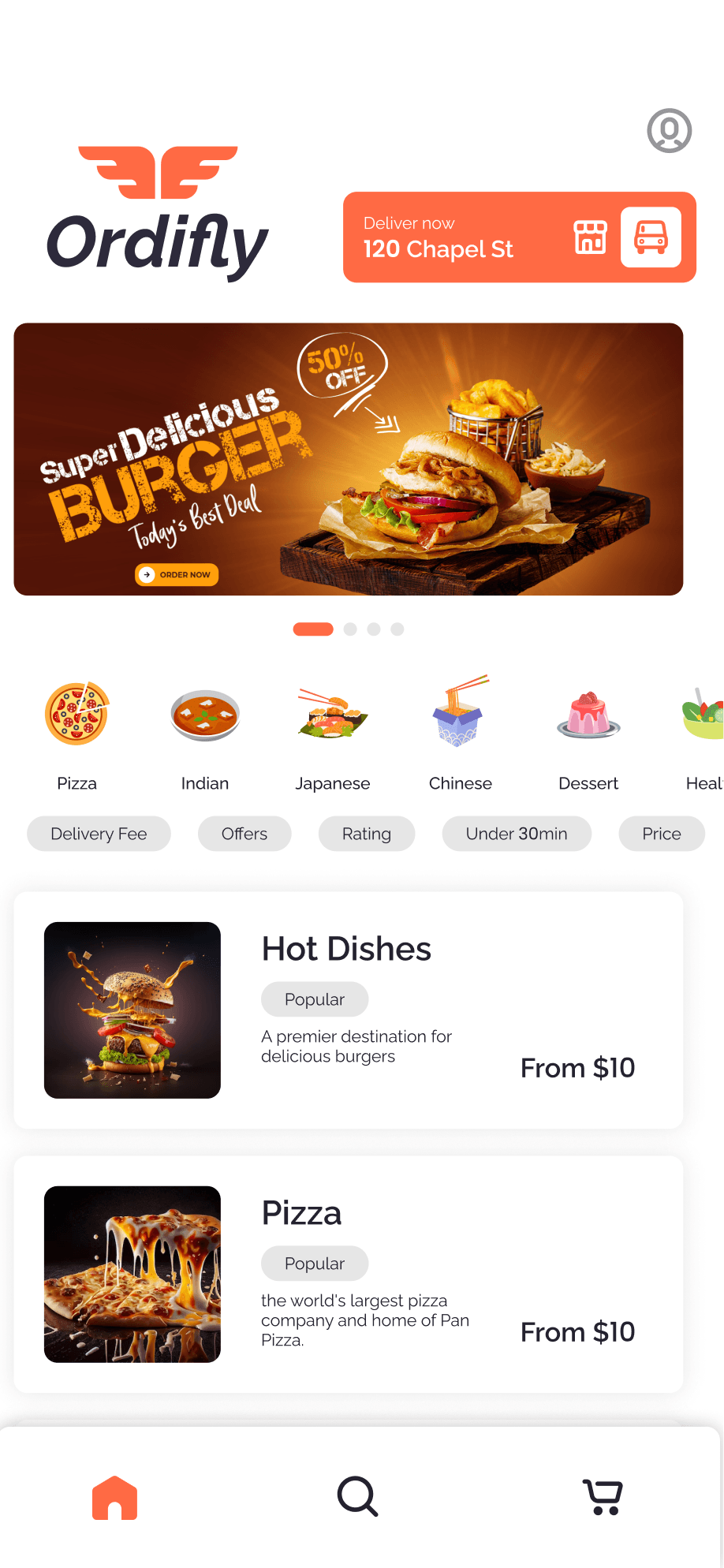
"Discover the Food" Simplifies finding favourite dishes with personalized suggestions, filters, and visual menus.

Add to Cart Step 02
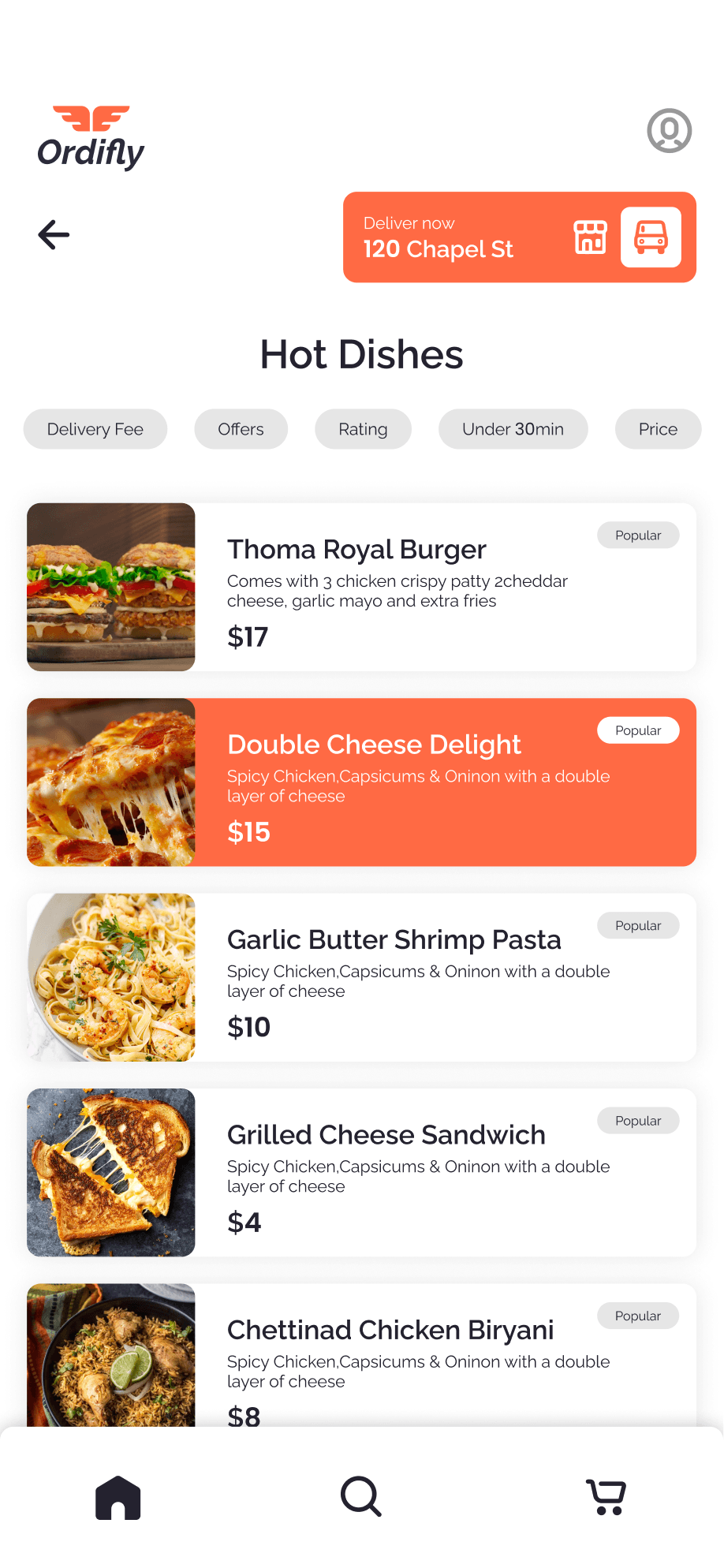
"Select the Food" lets users choose dishes based on reviews, price, and popular categories, ensuring informed and satisfying choices.
Add to Cart Step 03
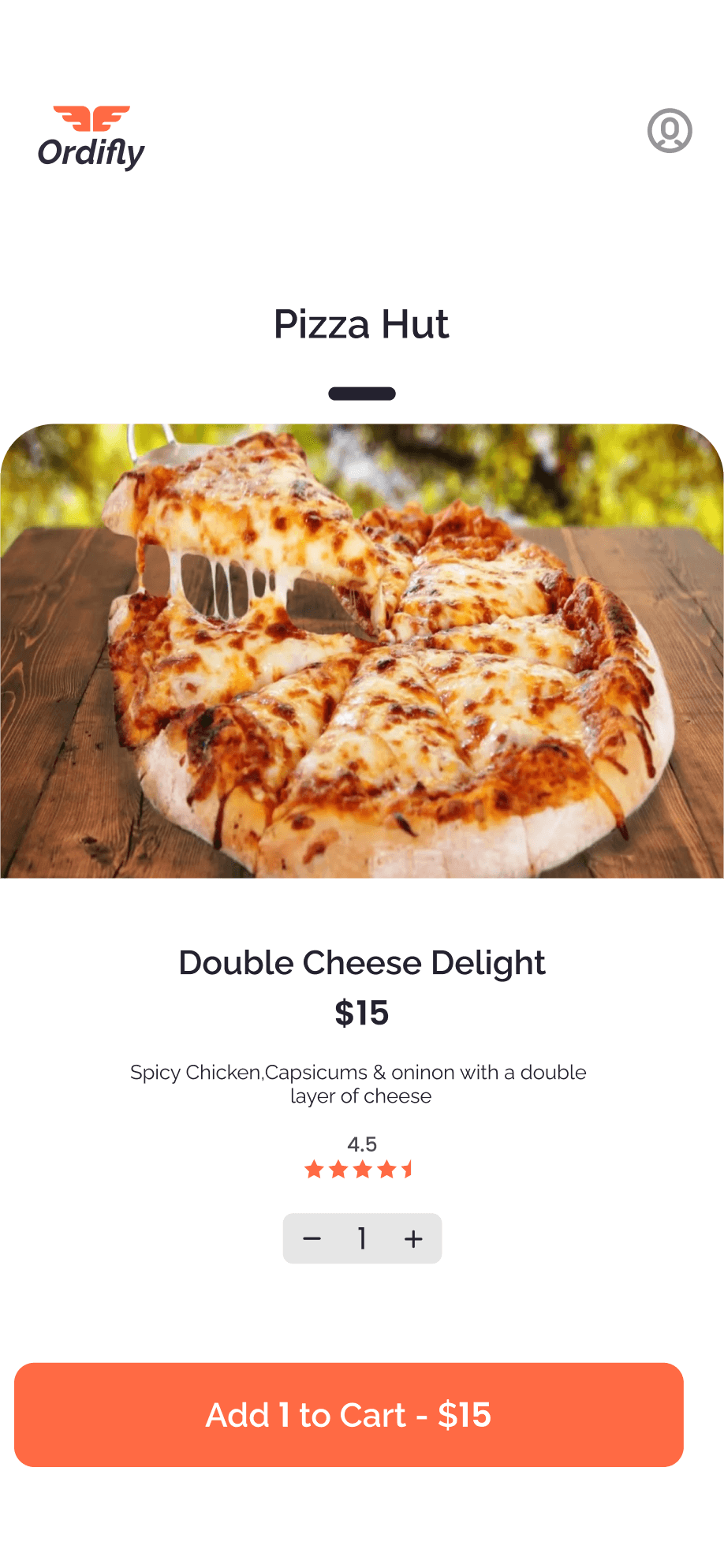
"Select Quantity" allows users to choose portions, review pricing, and add items to the cart seamlessly
Add to Cart Step 04
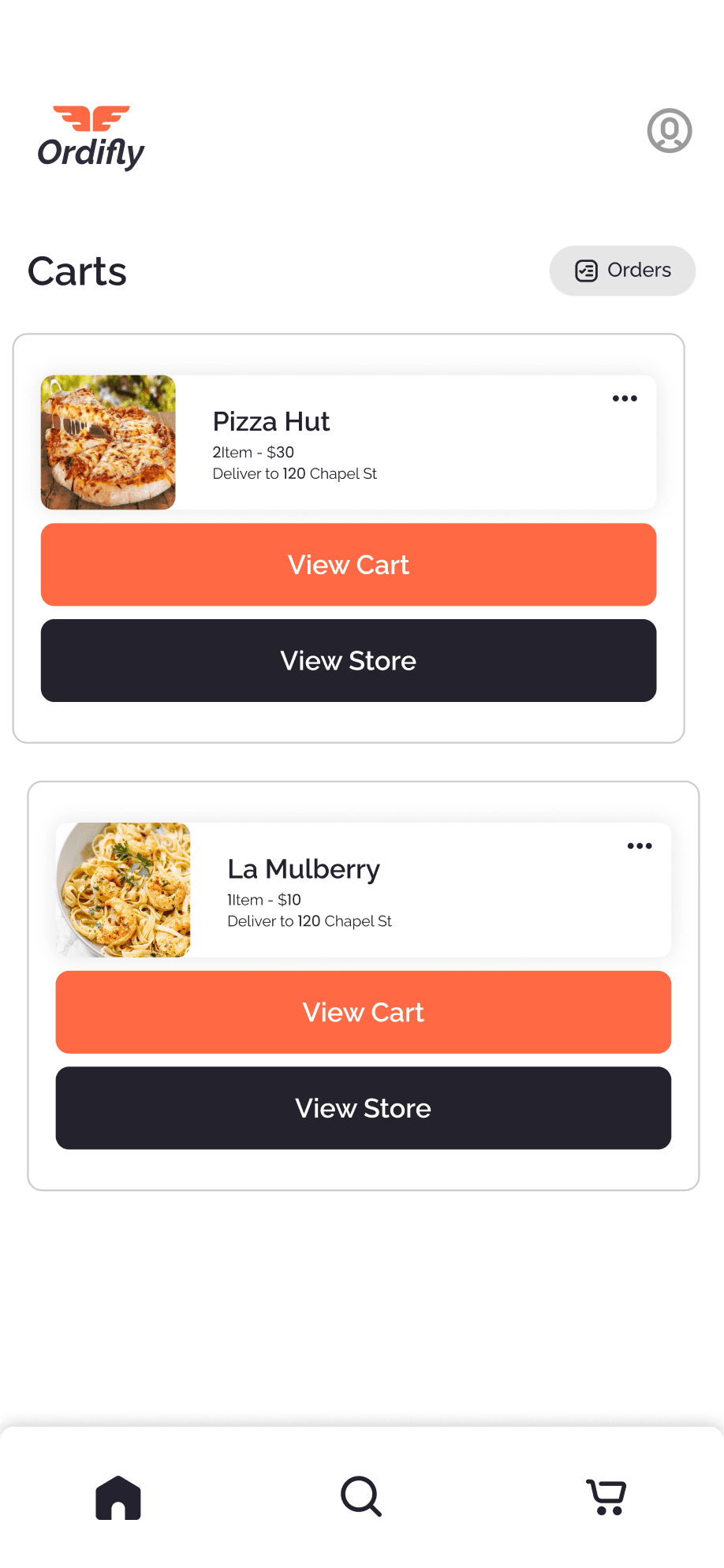
"Select Cart" enables users to choose which vendor’s cart to checkout from, streamlining orders from multiple vendors.
Add to Cart Step 05
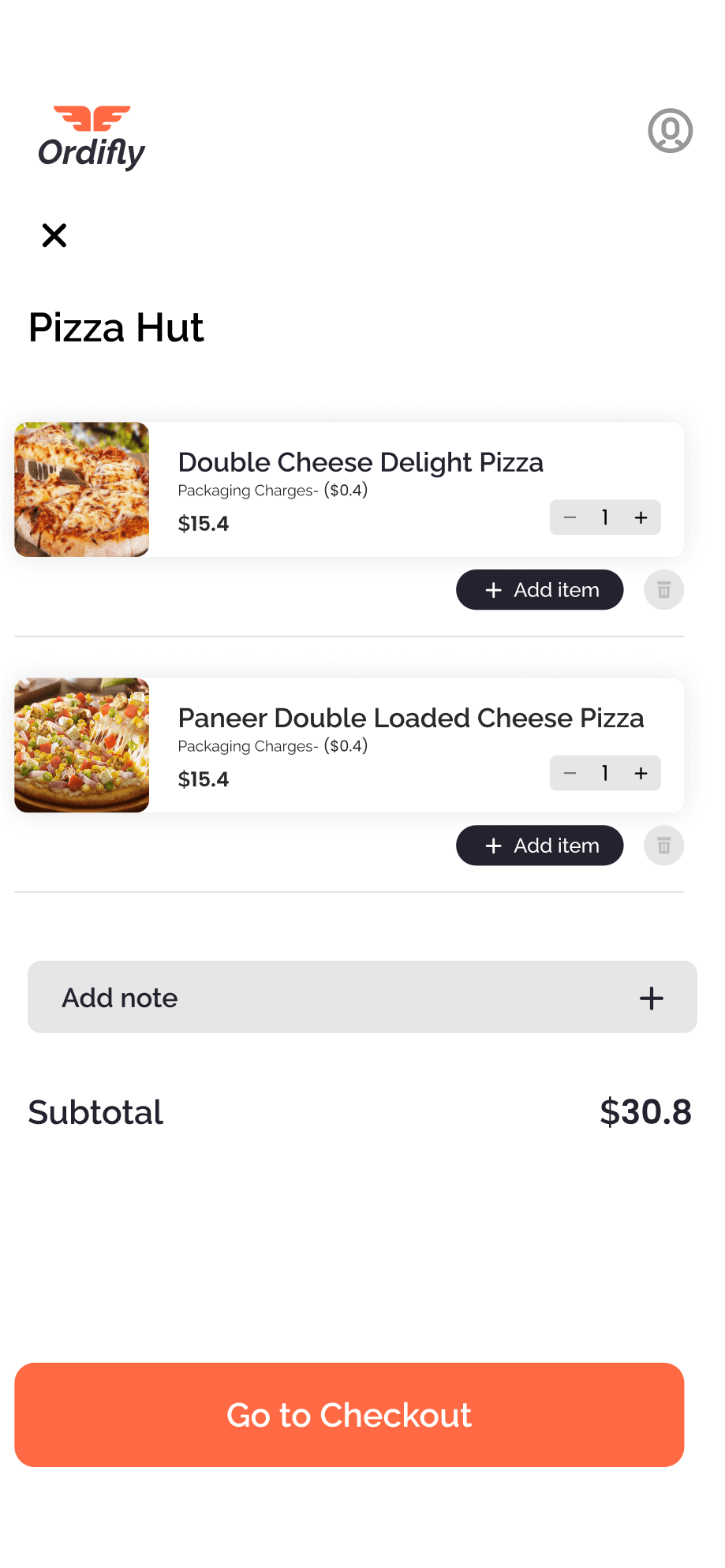
"Review Cart" lets users verify items, quantities, and prices before proceeding to checkout for a smooth ordering experience.
Add to Cart Step 01
"Discover the Food" Simplifies finding favourite dishes with personalized suggestions, filters, and visual menus.
Add to Cart Step 02
"Select the Food" lets users choose dishes based on reviews, price, and popular categories, ensuring informed and satisfying choices.
Add to Cart Step 03
"Select Quantity" allows users to choose portions, review pricing, and add items to the cart seamlessly
Add to Cart Step 04
"Select Cart" enables users to choose which vendor’s cart to checkout from, streamlining orders from multiple vendors.
Add to Cart Step 05
"Review Cart" lets users verify items, quantities, and prices before proceeding to checkout for a smooth ordering experience.
Add to Cart Step 01
"Discover the Food" Simplifies finding favourite dishes with personalized suggestions, filters, and visual menus.
Add to Cart Step 02
"Select the Food" lets users choose dishes based on reviews, price, and popular categories, ensuring informed and satisfying choices.
Add to Cart Step 03
"Select Quantity" allows users to choose portions, review pricing, and add items to the cart seamlessly
Add to Cart Step 04
"Select Cart" enables users to choose which vendor’s cart to checkout from, streamlining orders from multiple vendors.
Add to Cart Step 05
"Review Cart" lets users verify items, quantities, and prices before proceeding to checkout for a smooth ordering experience.
Add to Cart Step 01
"Discover the Food" Simplifies finding favourite dishes with personalized suggestions, filters, and visual menus.
Add to Cart Step 02
"Select the Food" lets users choose dishes based on reviews, price, and popular categories, ensuring informed and satisfying choices.
Add to Cart Step 03
"Select Quantity" allows users to choose portions, review pricing, and add items to the cart seamlessly
Add to Cart Step 04
"Select Cart" enables users to choose which vendor’s cart to checkout from, streamlining orders from multiple vendors.
Add to Cart Step 05
"Review Cart" lets users verify items, quantities, and prices before proceeding to checkout for a smooth ordering experience.
Add to Cart Step 01
"Discover the Food" Simplifies finding favourite dishes with personalized suggestions, filters, and visual menus.
Add to Cart Step 02
"Select the Food" lets users choose dishes based on reviews, price, and popular categories, ensuring informed and satisfying choices.
Add to Cart Step 03
"Select Quantity" allows users to choose portions, review pricing, and add items to the cart seamlessly
Add to Cart Step 04
"Select Cart" enables users to choose which vendor’s cart to checkout from, streamlining orders from multiple vendors.
Add to Cart Step 05
"Review Cart" lets users verify items, quantities, and prices before proceeding to checkout for a smooth ordering experience.
Add to Cart Step 01
"Discover the Food" Simplifies finding favourite dishes with personalized suggestions, filters, and visual menus.
Add to Cart Step 02
"Select the Food" lets users choose dishes based on reviews, price, and popular categories, ensuring informed and satisfying choices.
Add to Cart Step 03
"Select Quantity" allows users to choose portions, review pricing, and add items to the cart seamlessly
Add to Cart Step 04
"Select Cart" enables users to choose which vendor’s cart to checkout from, streamlining orders from multiple vendors.
Add to Cart Step 05
"Review Cart" lets users verify items, quantities, and prices before proceeding to checkout for a smooth ordering experience.
Add to Cart Step 01
"Discover the Food" Simplifies finding favourite dishes with personalized suggestions, filters, and visual menus.
Add to Cart Step 02
"Select the Food" lets users choose dishes based on reviews, price, and popular categories, ensuring informed and satisfying choices.
Add to Cart Step 03
"Select Quantity" allows users to choose portions, review pricing, and add items to the cart seamlessly
Add to Cart Step 04
"Select Cart" enables users to choose which vendor’s cart to checkout from, streamlining orders from multiple vendors.
Add to Cart Step 05
"Review Cart" lets users verify items, quantities, and prices before proceeding to checkout for a smooth ordering experience.
Add to Cart Step 01
"Discover the Food" Simplifies finding favourite dishes with personalized suggestions, filters, and visual menus.
Add to Cart Step 02
"Select the Food" lets users choose dishes based on reviews, price, and popular categories, ensuring informed and satisfying choices.
Add to Cart Step 03
"Select Quantity" allows users to choose portions, review pricing, and add items to the cart seamlessly
Add to Cart Step 04
"Select Cart" enables users to choose which vendor’s cart to checkout from, streamlining orders from multiple vendors.
Add to Cart Step 05
"Review Cart" lets users verify items, quantities, and prices before proceeding to checkout for a smooth ordering experience.
Checkout Process
Checkout process 01
"Checkout" ensures a seamless experience by confirming the delivery address, selecting the order type, reviewing the order summary, and placing the order.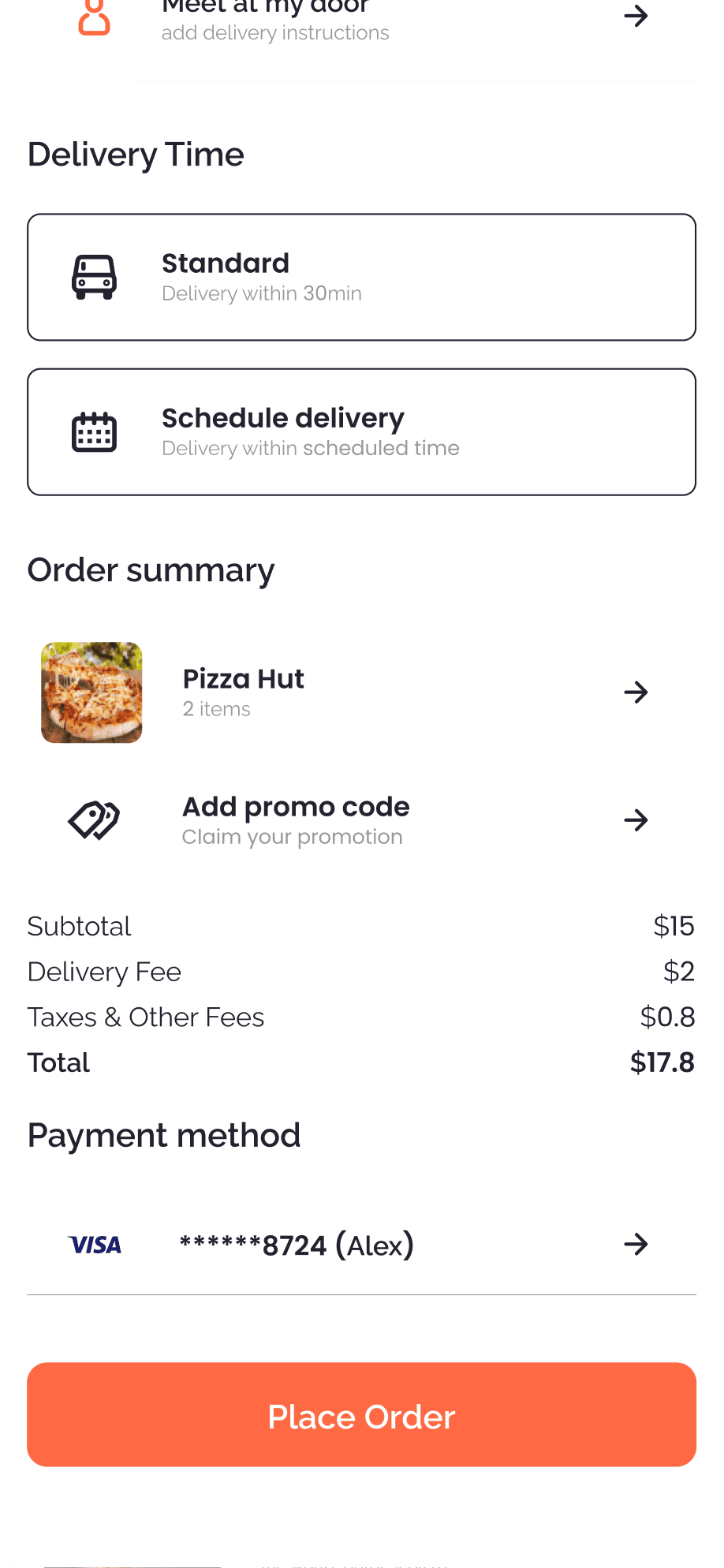
Checkout process 02
"Placing Order" involves verifying the order details and confirming the purchase before proceeding.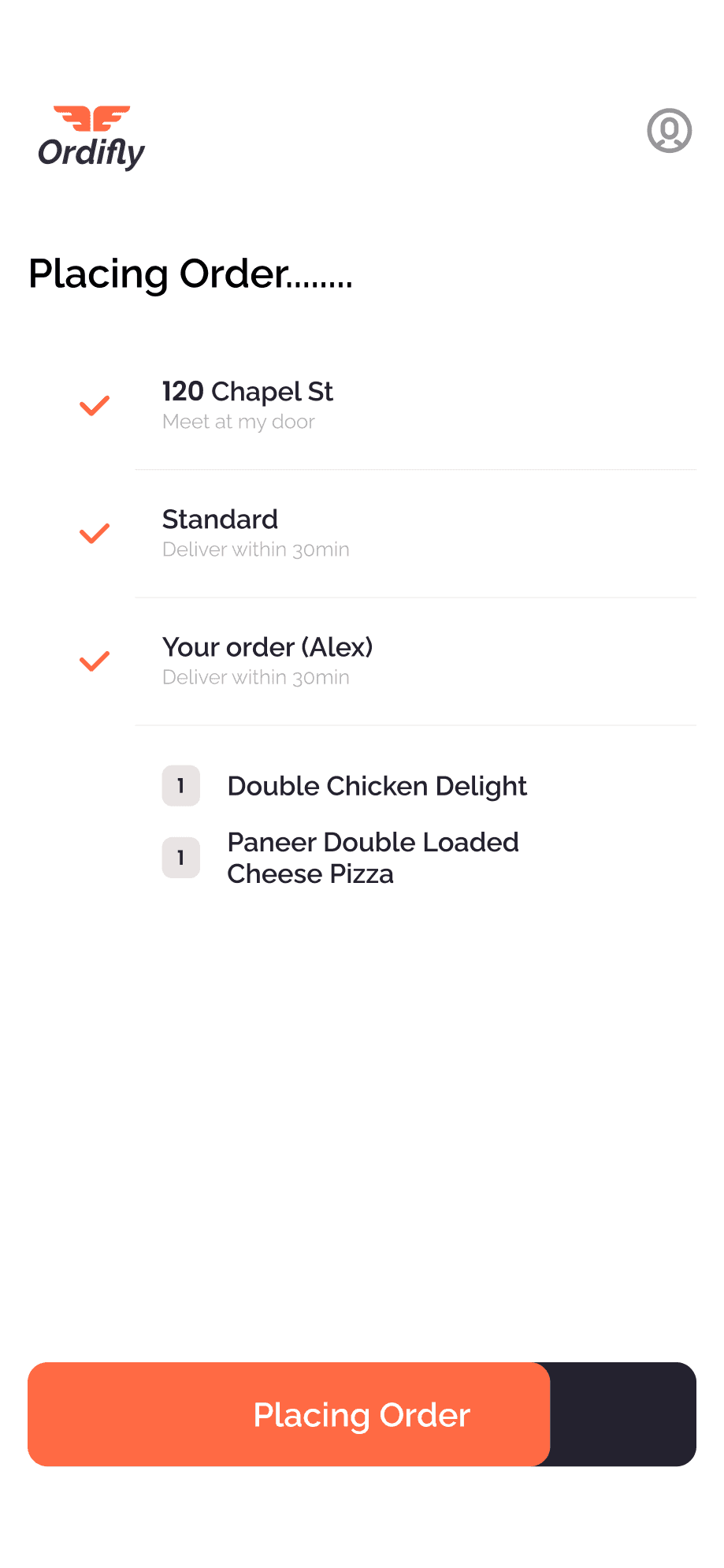
Checkout process 03
"Order Confirmed" sends a confirmation message to notify the user that their order has been successfully placed.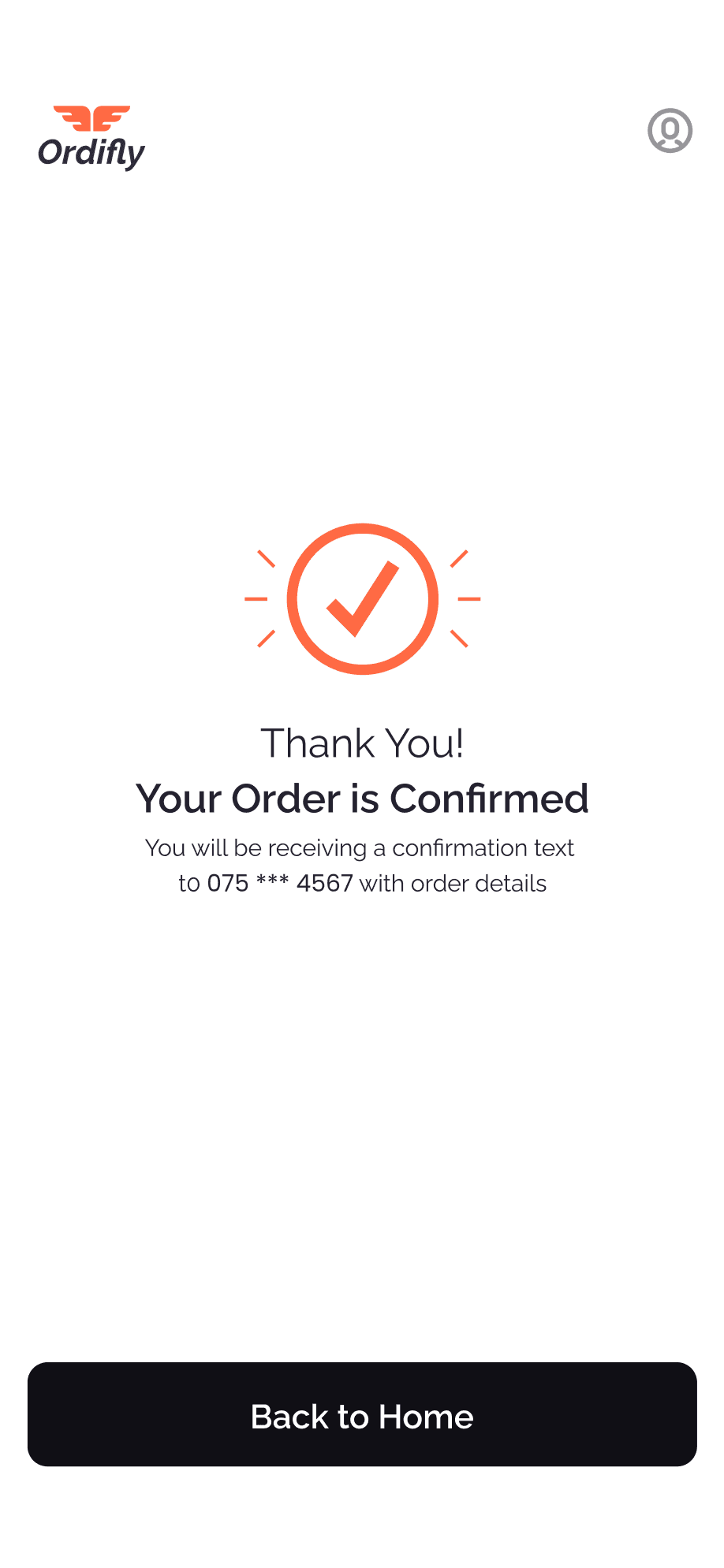
Checkout process 01
"Checkout" ensures a seamless experience by confirming the delivery address, selecting the order type, reviewing the order summary, and placing the order.Checkout process 02
"Placing Order" involves verifying the order details and confirming the purchase before proceeding.Checkout process 03
"Order Confirmed" sends a confirmation message to notify the user that their order has been successfully placed.Checkout process 01
"Checkout" ensures a seamless experience by confirming the delivery address, selecting the order type, reviewing the order summary, and placing the order.Checkout process 02
"Placing Order" involves verifying the order details and confirming the purchase before proceeding.Checkout process 03
"Order Confirmed" sends a confirmation message to notify the user that their order has been successfully placed.Checkout process 01
"Checkout" ensures a seamless experience by confirming the delivery address, selecting the order type, reviewing the order summary, and placing the order.Checkout process 02
"Placing Order" involves verifying the order details and confirming the purchase before proceeding.Checkout process 03
"Order Confirmed" sends a confirmation message to notify the user that their order has been successfully placed.
Checkout process 01
"Checkout" ensures a seamless experience by confirming the delivery address, selecting the order type, reviewing the order summary, and placing the order.Checkout process 02
"Placing Order" involves verifying the order details and confirming the purchase before proceeding.Checkout process 03
"Order Confirmed" sends a confirmation message to notify the user that their order has been successfully placed.Checkout process 01
"Checkout" ensures a seamless experience by confirming the delivery address, selecting the order type, reviewing the order summary, and placing the order.Checkout process 02
"Placing Order" involves verifying the order details and confirming the purchase before proceeding.Checkout process 03
"Order Confirmed" sends a confirmation message to notify the user that their order has been successfully placed.Checkout process 01
"Checkout" ensures a seamless experience by confirming the delivery address, selecting the order type, reviewing the order summary, and placing the order.Checkout process 02
"Placing Order" involves verifying the order details and confirming the purchase before proceeding.Checkout process 03
"Order Confirmed" sends a confirmation message to notify the user that their order has been successfully placed.Checkout process 01
"Checkout" ensures a seamless experience by confirming the delivery address, selecting the order type, reviewing the order summary, and placing the order.Checkout process 02
"Placing Order" involves verifying the order details and confirming the purchase before proceeding.Checkout process 03
"Order Confirmed" sends a confirmation message to notify the user that their order has been successfully placed.
Add to Cart Step 01
"Discover the Food" Simplifies finding favourite dishes with personalized suggestions, filters, and visual menus.
Add to Cart Step 02
"Select the Food" lets users choose dishes based on reviews, price, and popular categories, ensuring informed and satisfying choices.
Add to Cart Step 03
"Select Quantity" allows users to choose portions, review pricing, and add items to the cart seamlessly
Add to Cart Step 04
"Select Cart" enables users to choose which vendor’s cart to checkout from, streamlining orders from multiple vendors.
Add to Cart Step 05
"Review Cart" lets users verify items, quantities, and prices before proceeding to checkout for a smooth ordering experience.
Add to Cart Step 01
"Discover the Food" Simplifies finding favourite dishes with personalized suggestions, filters, and visual menus.
Add to Cart Step 02
"Select the Food" lets users choose dishes based on reviews, price, and popular categories, ensuring informed and satisfying choices.
Add to Cart Step 03
"Select Quantity" allows users to choose portions, review pricing, and add items to the cart seamlessly
Add to Cart Step 04
"Select Cart" enables users to choose which vendor’s cart to checkout from, streamlining orders from multiple vendors.
Add to Cart Step 05
"Review Cart" lets users verify items, quantities, and prices before proceeding to checkout for a smooth ordering experience.
Add to Cart Step 01
"Discover the Food" Simplifies finding favourite dishes with personalized suggestions, filters, and visual menus.
Add to Cart Step 02
"Select the Food" lets users choose dishes based on reviews, price, and popular categories, ensuring informed and satisfying choices.
Add to Cart Step 03
"Select Quantity" allows users to choose portions, review pricing, and add items to the cart seamlessly
Add to Cart Step 04
"Select Cart" enables users to choose which vendor’s cart to checkout from, streamlining orders from multiple vendors.
Add to Cart Step 05
"Review Cart" lets users verify items, quantities, and prices before proceeding to checkout for a smooth ordering experience.
Add to Cart Step 01
"Discover the Food" Simplifies finding favourite dishes with personalized suggestions, filters, and visual menus.
Add to Cart Step 02
"Select the Food" lets users choose dishes based on reviews, price, and popular categories, ensuring informed and satisfying choices.
Add to Cart Step 03
"Select Quantity" allows users to choose portions, review pricing, and add items to the cart seamlessly
Add to Cart Step 04
"Select Cart" enables users to choose which vendor’s cart to checkout from, streamlining orders from multiple vendors.
Add to Cart Step 05
"Review Cart" lets users verify items, quantities, and prices before proceeding to checkout for a smooth ordering experience.
Checkout process 01
"Checkout" ensures a seamless experience by confirming the delivery address, selecting the order type, reviewing the order summary, and placing the order.Checkout process 02
"Placing Order" involves verifying the order details and confirming the purchase before proceeding.Checkout process 03
"Order Confirmed" sends a confirmation message to notify the user that their order has been successfully placed.Checkout process 01
"Checkout" ensures a seamless experience by confirming the delivery address, selecting the order type, reviewing the order summary, and placing the order.Checkout process 02
"Placing Order" involves verifying the order details and confirming the purchase before proceeding.Checkout process 03
"Order Confirmed" sends a confirmation message to notify the user that their order has been successfully placed.Checkout process 01
"Checkout" ensures a seamless experience by confirming the delivery address, selecting the order type, reviewing the order summary, and placing the order.Checkout process 02
"Placing Order" involves verifying the order details and confirming the purchase before proceeding.Checkout process 03
"Order Confirmed" sends a confirmation message to notify the user that their order has been successfully placed.Checkout process 01
"Checkout" ensures a seamless experience by confirming the delivery address, selecting the order type, reviewing the order summary, and placing the order.Checkout process 02
"Placing Order" involves verifying the order details and confirming the purchase before proceeding.Checkout process 03
"Order Confirmed" sends a confirmation message to notify the user that their order has been successfully placed.
Challenge
In developing our food delivery app, Ordifly, our primary challenge was creating a seamlessly user-friendly solution that empowers users with easy control over their meal orders. Striking the right balance to ensure a smooth and delightful dining experience was our core focus.
Contact Me
+94 76 376 2704
shehanjayarathna24@gmail.com
236/A Kiralagama, Batugoda, Kandy
© 2024 – Shehan Jayarathna
Contact Me
+94 76 376 2704
shehanjayarathna24@gmail.com
236/A Kiralagama, Batugoda, Kandy
© 2024 – Shehan Jayarathna
Contact Me
+94 76 376 2704
shehanjayarathna24@gmail.com
236/A Kiralagama, Batugoda, Kandy
© 2024 – Shehan Jayarathna